Building Web Search Agent with Google-ADK
This guide walks you through setting up a powerful WebSearch agent that leverages Google ADK for orchestration and LangDB for LLM access, tracing, and flexible routing.
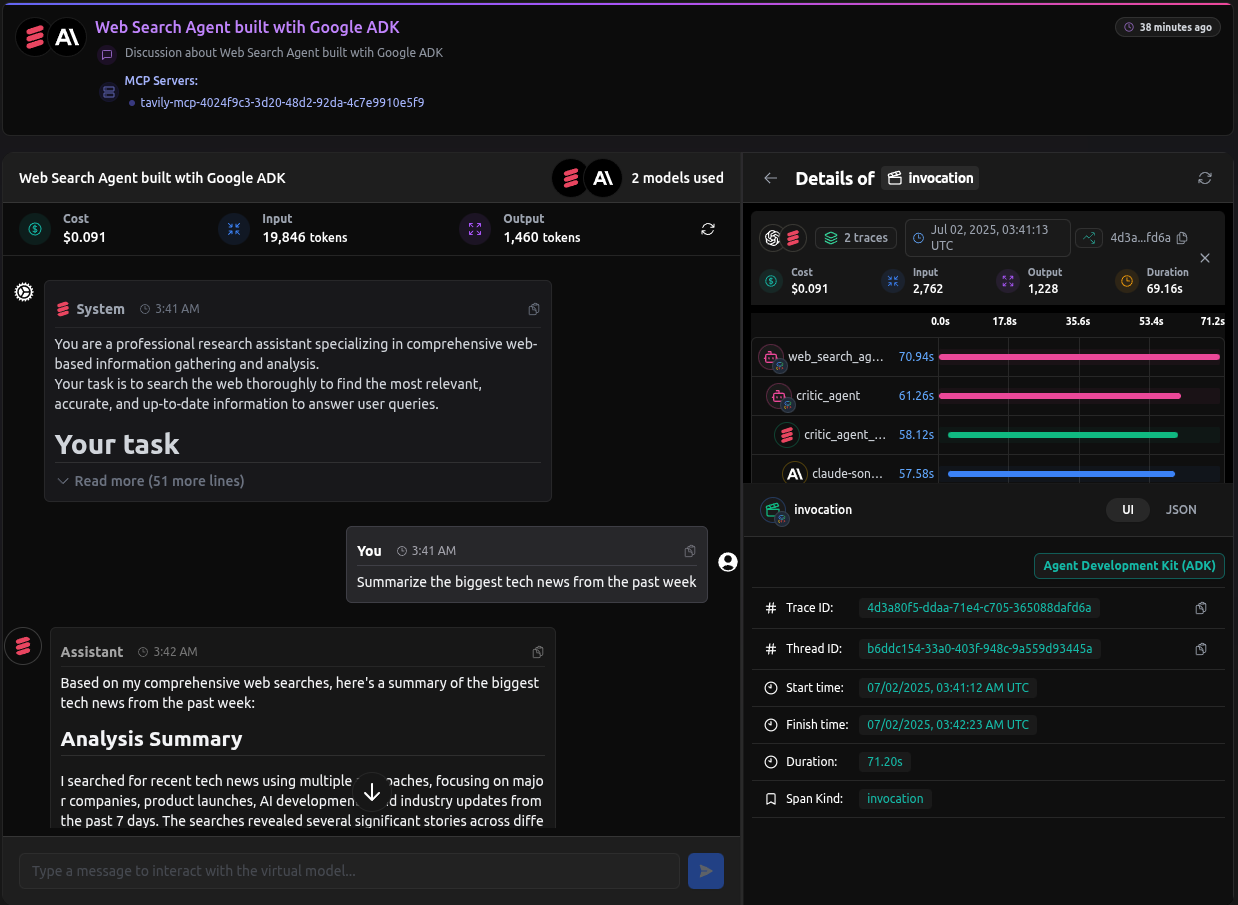
Checkout: https://app.langdb.ai/sharing/threads/b6ddc154-33a0-403f-948c-9a559d93445a
Code
- LangDB Samples: https://github.com/langdb/langdb-samples/tree/main/examples/google-adk/web-search-agent
Overview
The final agent will use a SequentialAgent to orchestrate two sub-agents:
- Critic Agent: Receives a user's query, searches the web for information using a tool, and provides an initial analysis with source references.
- Reviser Agent: Takes the critic's output, refines the content, and synthesizes a final, polished answer.
LangDB automatically captures the entire workflow, giving you full visibility into the handoff between agents and the tools they use.
Installation
pip install google-adk "pylangdb[adk]" python-dotenv
Environment Variables
export LANGDB_API_KEY="<your_langdb_api_key>"
export LANGDB_PROJECT_ID="<your_langdb_project_id>"
Project Structure
web-search-agent/
├── web-search/
│   ├── agent.py          # Root SequentialAgent
│   ├── __init__.py
│   └── sub_agents/
│       ├── __init__.py
│       ├── critic/
│       │   ├── agent.py # Uses Virtual Model
│       │   ├── __init__.py
│       │   └── prompt.py # Contains the critic's instruction prompt
│       └── reviser/
│           ├── agent.py
│           ├── __init__.py
│           └── prompt.py # Contains the reviser's instruction prompt
└── pyproject.toml
Code Walkthrough
Initialize LangDB Tracing
The most important step is to call pylangdb.adk.init() before any Google ADK modules are imported. This instruments the environment for automatic tracing.
# web-search/agent.py

from pylangdb.adk import init
init()

from google.adk.agents import SequentialAgent
from .sub_agents.critic import critic_agent
from .sub_agents.reviser import reviser_agent
# ...
Define the Critic Agent with a Virtual Model
The critic_agent is responsible for the web search. Instead of hard-coding a tool, we assign it a LangDB Virtual Model. This virtual model has a Tavily Search MCP attached, giving the agent search capabilities without changing its code.
# web-search/sub_agents/critic/agent.py

from google.adk.agents import Agent
# ... other imports for the callback ...

critic_agent = Agent(
    # This virtual model has a Tavily Search MCP attached in the LangDB UI
    model="langdb/critic_agent_37r6urik",
    name="critic_agent",
    instruction=prompt.CRITIC_PROMPT,
    after_model_callback=_render_reference # Formats search results
)
Define the Sequential Agent
The root agent.py defines a SequentialAgent that orchestrates the workflow, passing the user's query first to the critic_agent and then its output to the reviser_agent.
# web-search/agent.py

# ... imports and init() call ...

llm_auditor = SequentialAgent(
    name='web_search_agent',
    description=(
        'A 2-step web search agent that first searches and analyzes web content,'
        ' then refines and synthesizes the information to provide comprehensive'
        ' answers to user queries.'
    ),
    sub_agents=[critic_agent, reviser_agent],
)

# This is the entry point for the ADK
root_agent = llm_auditor
Configuring MCPs and Virtual Models
To empower the critic_agent with live web search, we first create a Virtual MCP Server for the search tool and then attach it to a Virtual Model.
1. Create a Virtual MCP Server
First, create a dedicated MCP server for the search tool.
- In the LangDB UI, navigate to Projects → MCP Servers.
- Click + New Virtual MCP Server and configure it:
- Name:
web-search-mcp - Underlying MCP: Select Tavily Search.
- Note: The Tavily MCP requires an API key. Ensure you have added your
TAVILY_API_KEYto your LangDB account secrets for the tool to function.
- Name:
2. Create and Configure the Virtual Model
Next, create a virtual model and attach the MCP you just made.
- Navigate to Models → + New Virtual Model.
- Give it a name (e.g.,
critic-agent). - In the Tools section, click + Attach MCP Server and select the
web-search-mcpyou created. - Save the model and copy its identifier (e.g.,
langdb/critic-agent_xxxxxx). - Use this identifier as the
modelin yourcritic_agentdefinition.
Running the Agent
With your pyproject.toml configured for the ADK, you can run the agent locally:
adk web
Navigate to http://localhost:8000, select web-search, and enter a query.
Full Trace
Every run is captured in LangDB, showing the full sequence from the initial query to the final revised answer, including the tool calls made by the critic agent.
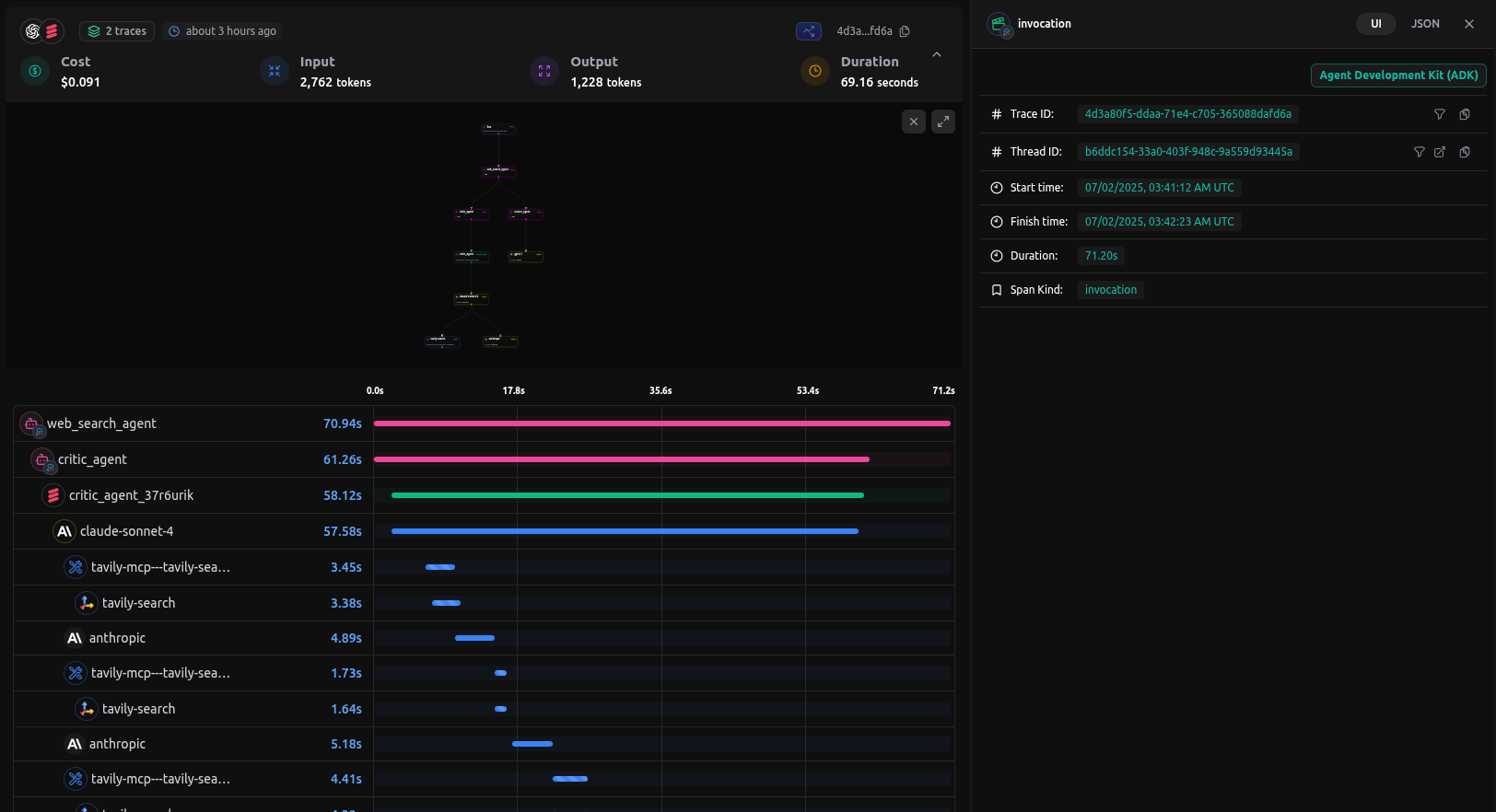
You can checkout the entire conversation history as well as tracing from the thread:
Checkout: Google ADK Agent Thread