Building Complex Data Extraction with LangGraph
This guide shows how to build a sophisticated LangGraph agent for extracting structured information from meeting transcripts using LangDB. Leverage LangDB's AI gateway to create multi-stage workflows with confidence scoring, validation loops, and comprehensive tracing.
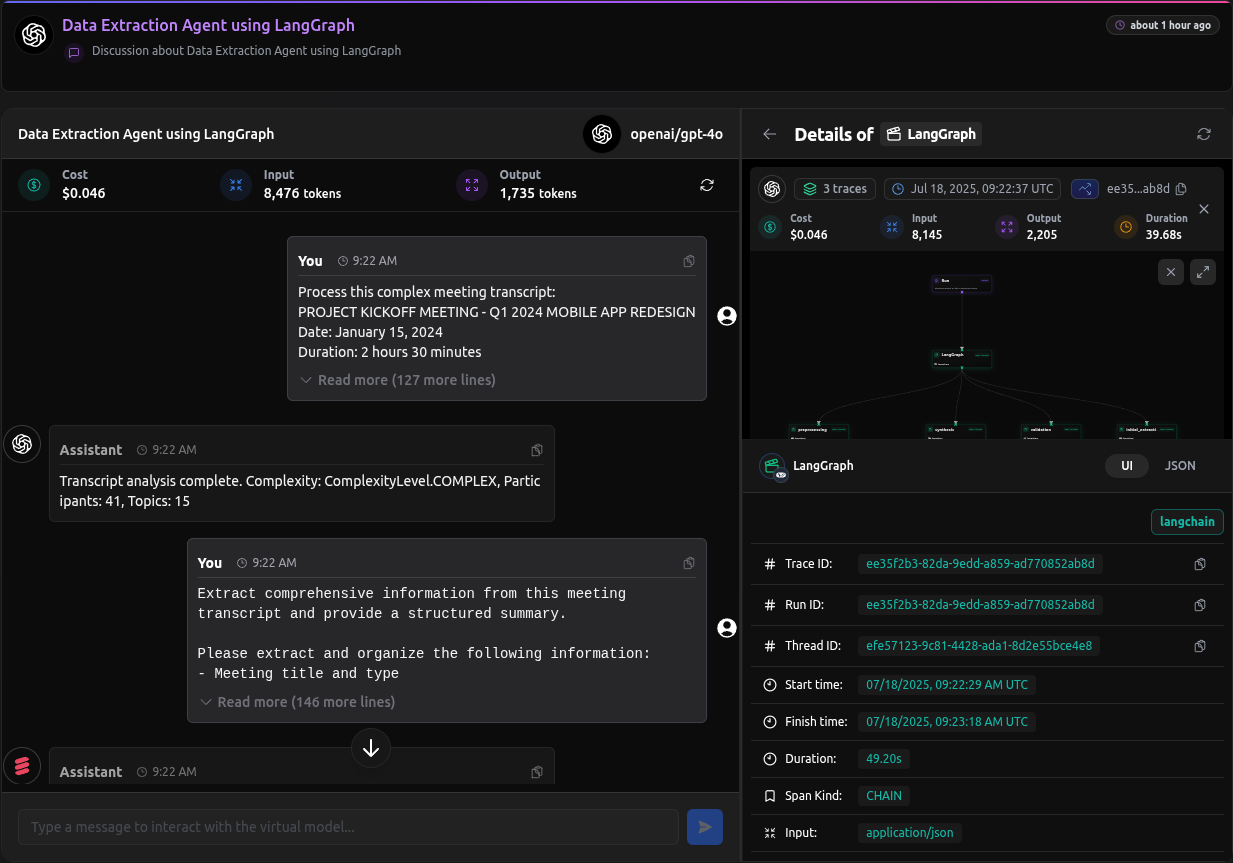
Checkout: https://app.langdb.ai/sharing/threads/efe57123-9c81-4428-ada1-8d2e55bce4e8
Code
- LangDB Samples: https://github.com/langdb/langdb-samples/tree/main/examples/langchain/langchain-data-extraction
Overview
The Complex Data Extraction agent processes meeting transcripts through a multi-stage workflow with validation, refinement, and synthesis phases.
Data Extraction Architecture
The system implements these specialized processing stages:
- Preprocessing Node: Analyzes transcript structure and determines complexity
- Initial Extraction Node: Performs data extraction with confidence scoring
- Validation Node: Validates extraction quality and provides feedback
- Refinement Node: Refines extraction based on validation feedback
- Synthesis Node: Produces final comprehensive summary
- Fallback Node: Provides simplified extraction if complex workflow fails
Key Benefits
With LangDB, this multi-stage extraction system gains:
- End-to-End Tracing: Complete visibility into processing stages and decision points
- Confidence Scoring: Built-in quality assessment for each extraction section
- Iterative Refinement: Multiple validation loops with feedback-driven improvements
- Modular Architecture: Clean separation of concerns across nodes and tools
- Robust Error Handling: Fallback mechanisms ensure reliable processing
- Centralized Configuration: All LLM calls routed through LangDB's AI gateway
Installation
pip install pylangdb[langchain] langchain langgraph langchain_openai pydantic python-dotenv
Environment Variables
Create a .env file in your project root with the following variables:
# Required for AI platform integration
LANGDB_API_KEY="your_api_key_here"
LANGDB_PROJECT_ID="your_project_id_here"
LANGDB_API_BASE_URL="https://api.langdb.ai"
Project Structure
langchain-data-extraction/
├── .env
├── README.md
├── requirements.txt
├── main.py              # Main execution script
├── agent.py             # Agent construction and workflow
├── models.py            # Data models and state definitions
├── nodes.py             # Node functions and routing logic
├── tools.py             # Tool definitions
└── transcript.py        # Sample transcript data
How the Integration Works
Seamless LangGraph Integration
The key to enhancing LangGraph with LangDB is directing all LLM calls through a centralized AI gateway:
# main.py

from pylangdb.langchain import init

# Initialize LangDB tracing BEFORE importing any LangGraph modules
init()
By calling init() before any LangGraph imports, the integration:
- Patches LangGraph's underlying model calling mechanisms
- Routes all LLM requests through LangDB's API
- Attaches tracing metadata to each request
- Captures all node transitions and tool calls
This provides comprehensive observability into complex multi-stage workflows.
Virtual Model References
Instead of hardcoding model names, we reference LangDB virtual models:
# nodes.py

def create_model():
    """Create and return the ChatOpenAI model with tools bound."""
    api_base = os.getenv("LANGDB_API_BASE_URL")
    api_key = os.getenv("LANGDB_API_KEY")
    project_id = os.getenv("LANGDB_PROJECT_ID")

    default_headers = {"x-project-id": project_id}

    llm = ChatOpenAI(
        model_name='openai/gpt-4o',
        temperature=0.2,
        openai_api_base=f"{api_base}/v1",
        openai_api_key=api_key,
        default_headers=default_headers
    )

    return llm.bind_tools([
        analyze_transcript_structure,
        extract_with_confidence,
        validate_extraction,
        refine_extraction
    ])
The model_name='openai/gpt-4o' parameter can be replaced with a LangDB Virtual Model reference that includes:
- A specific underlying LLM
- Attached tools and MCPs
- Guardrails for input/output validation
- Custom handling and retry logic
This approach offloads complexity from the application code to LangDB AI gateway.
Modular State Management
The system uses TypedDict for type-safe state management:
# models.py

class ComplexAgentState(TypedDict):
    """Extended state for complex extraction workflow"""
    messages: Annotated[Sequence[BaseMessage], add_messages]
    transcript: str
    complexity_level: ComplexityLevel
    extraction_attempts: int
    max_attempts: int
    confidence_scores: Dict[str, float]
    validation_feedback: List[str]
    extraction_data: Dict[str, Any]
    current_phase: ExtractionPhase
    requires_refinement: bool
    processing_complete: bool
    error_count: int
This state structure enables type safety, observability, debugging, and extensibility.
Advanced Workflow Patterns
The agent implements sophisticated workflow patterns:
# agent.py

def create_complex_agent():
    """Create and return the complex LangGraph agent"""

    workflow = StateGraph(ComplexAgentState)

    # Add nodes
    workflow.add_node("preprocessing", preprocessing_node)
    workflow.add_node("initial_extraction", initial_extraction_node)
    workflow.add_node("validation", validation_node)
    workflow.add_node("refinement", refinement_node)
    workflow.add_node("synthesis", synthesis_node)
    workflow.add_node("fallback", fallback_node)
    workflow.add_node("tool_node", ToolNode([
        analyze_transcript_structure,
        extract_with_confidence,
        validate_extraction,
        refine_extraction
    ]))

    # Set entry point
    workflow.set_entry_point("preprocessing")

    # Add conditional edges for smart routing
    workflow.add_conditional_edges(
        "preprocessing",
        route_after_preprocessing,
        {
            "tool_node": "tool_node",
            "initial_extraction": "initial_extraction"
        }
    )

    return workflow.compile()
Key Benefits:
- Conditional Routing: Smart routing based on validation results
- Tool Integration: Seamless tool calls with automatic routing
- Error Recovery: Fallback mechanisms for robust processing
- Observability: Every decision point is traced in LangDB
Configuring Virtual Models and Tools
This approach separates tool configuration from code, moving it to a web interface where it can be managed without deployments.
Creating Virtual MCP Servers
Virtual MCP servers act as API gateways to external tools and services:
- In the LangDB UI, navigate to Projects → MCP Servers.
- Click + New Virtual MCP Server and create the necessary MCPs:
- Transcript Analysis MCP: For preprocessing and structure analysis
- Data Extraction MCP: For structured information extraction
- Validation MCP: For quality assessment and feedback
- Refinement MCP: For iterative improvement
Attaching MCPs to Virtual Models
Virtual models connect your agent code to the right tools automatically:
- Navigate to Models → + New Virtual Model.
- For the Preprocessing Node:
- Name:
transcript_preprocessing - Base Model:
openai/gpt-4o - Attach the Transcript Analysis MCP
- Add guardrails for transcript processing
- Name:
- For the Extraction Node:
- Name:
data_extraction - Base Model:
openai/gpt-4o - Attach the Data Extraction MCP
- Add custom response templates for structured output
- Name:
- For the Validation Node:
- Name:
extraction_validation - Base Model:
openai/gpt-4o - Attach the Validation MCP
- Add quality assessment rules
- Name:
Key Benefits:
- Separation of Concerns: Code handles workflow orchestration while LangDB handles tools and models
- Dynamic Updates: Change tools without redeploying your application
- Security: API keys stored securely in LangDB, not in application code
- Monitoring: Track usage patterns and error rates in one place
Run the Agent
python main.py
The agent will process the sample transcript and provide detailed output showing each processing phase, confidence scores, and the final synthesized summary.
Sample Output
Here are key snippets from running the complex data extraction agent:
Agent Startup:
uv run langchain-data-extraction/main.py
=== COMPLEX EXTRACTION AGENT STARTING ===
Transcript length: 7296 characters
Estimated complexity: ComplexityLevel.COMPLEX
Preprocessing Phase:
=== PREPROCESSING PHASE ===
Transcript analysis complete. Complexity: ComplexityLevel.COMPLEX, Participants: 41, Topics: 15
Initial Extraction:
**Meeting Summary: Q1 2024 Mobile App Redesign Project Kickoff**

**Participants and Their Roles:**
- Sarah Chen: Project Manager
- Marcus Rodriguez: Lead Developer
- Dr. Kim Patel: UX Research Director
- Jennifer Wu: Product Owner
- David Thompson: QA Manager
- Lisa Chang: Marketing Director
- Alex Kumar: DevOps Engineer
Validation Feedback:
**Validation Feedback on Meeting Summary Extraction:**

**Completeness of Information Extracted:**
- The summary captures the main points of the meeting, including participant roles, key decisions, action items, conflicts, and resolutions.
- It includes the meeting's purpose, duration, and date, which are essential for context.
Final Comprehensive Summary:
**Comprehensive Summary: Q1 2024 Mobile App Redesign Project Kickoff**

**Meeting Overview:**
- **Date:** January 15, 2024
- **Duration:** 2 hours 30 minutes
- **Purpose:** Initiate the mobile app redesign project aimed at improving user engagement by 40% and reducing bounce rate by 25%.

**Key Decisions:**
1. **Phased Launch Approach:** Soft launch on March 31st to selected users, full release on April 15th.
2. **Technical Architecture:** Adopt Redux Toolkit for state management and React Query for data fetching.

**Action Items:**
1. **CI/CD Pipeline Setup:** Alex Kumar to establish by January 29th (High Priority).
2. **Accessibility Testing Checklist:** Dr. Kim Patel to create by January 22nd (Medium Priority).
3. **Contractor Hiring:** Marcus Rodriguez to hire React Native contractor by January 20th (High Priority).

**Risk Assessment and Mitigation:**
- **Timeline and Migration Complexity:** Concerns over the tight timeline and React Native migration. Mitigation includes hiring a contractor and adjusting the release schedule.
- **Team Capacity:** Addressed by hiring additional resources due to a senior developer's medical leave.
This output demonstrates the agent's ability to:
- Process Complex Transcripts: Handle large transcripts (7,296 characters) with multiple participants and topics
- Multi-Stage Processing: Execute preprocessing, extraction, validation, and synthesis phases
- Comprehensive Extraction: Extract detailed information including participants, decisions, action items, conflicts, risks, and follow-up meetings
- Structured Output: Produce well-organized, comprehensive summaries with clear sections
- Quality Validation: Include validation feedback to ensure extraction quality
- Detailed Analysis: Provide insights into project goals, technical decisions, and risk mitigation strategies
The agent successfully transforms a raw meeting transcript into a structured, actionable summary that captures all critical information for project stakeholders.
Full Tracing with LangDB
The true power of the LangDB integration becomes apparent in the comprehensive tracing capabilities. While basic LangGraph provides conversation logging, LangDB captures every aspect of the complex workflow:
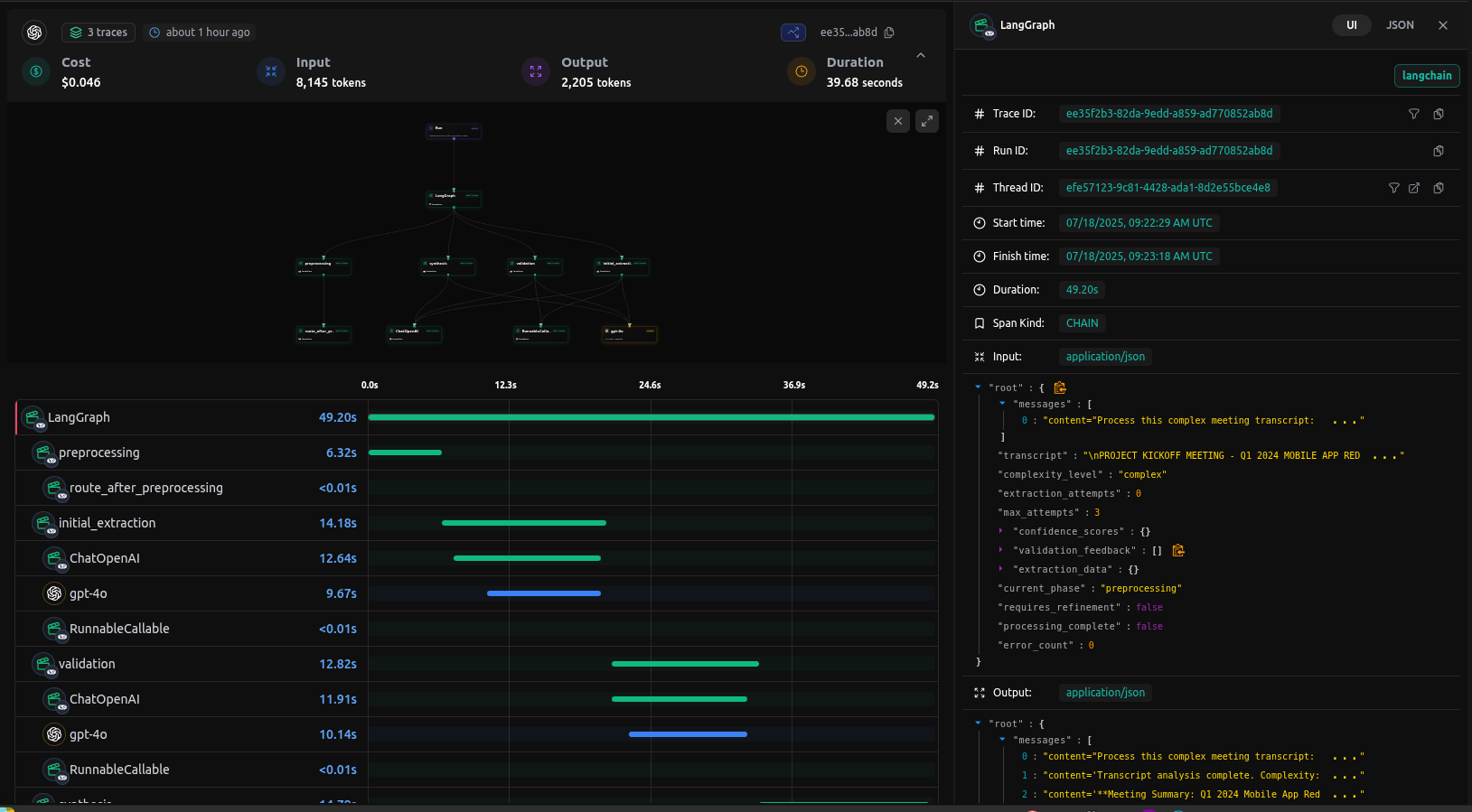
End-to-end tracing in LangDB shows all workflow stages and tool calls
In the LangDB trace view, you can see:
- Node Transitions: Exact flow between preprocessing → extraction → validation → synthesis
- Tool Calls: Every tool invocation with inputs and outputs
- Confidence Scores: Quality assessment for each extraction section
- State Changes: Complete state evolution throughout the workflow
- Performance Metrics: Token usage and timing for each LLM calls
Advanced Features
Confidence Scoring System
The agent implements a sophisticated confidence scoring system:
# tools.py

def extract_with_confidence(...) -> Dict[str, Any]:
    """Extract structured data with confidence scoring"""

    # Calculate confidence scores for different sections
    confidence_scores = {
        "participants": 0.95 if len(participants) > 0 else 0.3,
        "decisions": 0.9 if len(decisions) > 0 else 0.5,
        "action_items": 0.85 if len(action_items) > 0 else 0.4,
        "conflicts": 0.8 if len(conflicts) > 0 else 0.7,
        "phases": 0.9 if len(phases) > 0 else 0.6,
        "insights": 0.8 if len(key_insights) > 0 else 0.5
    }

    overall_confidence = sum(confidence_scores.values()) / len(confidence_scores)

    return {
        "extraction_data": extraction_data,
        "confidence_scores": confidence_scores,
        "overall_confidence": overall_confidence,
        "extraction_complete": overall_confidence > 0.7
    }
Conditional Routing Logic
The agent uses sophisticated routing logic:
# nodes.py

def route_after_validation(state: ComplexAgentState) -> str:
    """Route based on validation results"""
    if state["extraction_attempts"] >= state["max_attempts"]:
        return "synthesis"  # Skip to synthesis if too many attempts

    # Check for validation results in messages
    last_message = state["messages"][-1]
    if hasattr(last_message, 'tool_calls') and last_message.tool_calls:
        return "tool_node"

    # Default routing logic
    return "synthesis"
The system includes robust fallback mechanisms:
# nodes.py

def fallback_node(state: ComplexAgentState) -> Dict[str, Any]:
    """Fallback to simplified extraction if complex extraction fails"""
    print("\n=== FALLBACK PHASE ===")

    fallback_prompt = f"""
    Perform a simplified extraction from this transcript:
    {state['transcript']}

    Focus on basic information: participants, main topics, and key outcomes.
    Use a simpler structure if the complex extraction failed.
    """

    # Simplified processing logic
    response = llm.invoke([HumanMessage(content=fallback_prompt)])

    return {
        "messages": [response],
        "processing_complete": True,
        "current_phase": ExtractionPhase.FALLBACK
    }
Conclusion: Benefits of LangDB Integration
By enhancing LangGraph with LangDB integration, we've achieved several significant improvements:
- Comprehensive Observability: Full tracing of complex multi-stage workflows
- Modular Architecture: Clean separation of concerns across nodes and tools
- Quality Assurance: Built-in confidence scoring and validation loops
- Robust Error Handling: Fallback mechanisms ensure reliable processing
- Dynamic Configuration: Change tools and models without code changes
- Performance Monitoring: Track token usage and timing for optimization
This approach demonstrates how LangDB's AI gateway can enhance LangGraph by providing enhanced tracing, quality control, reliability, and maintainability.