Building Travel Concierge with Google-ADK
This guide demonstrates how to enhance Google's ADK Travel Concierge sample by integrating it with LangDB. By leveraging LangDB's AI gateway, you can offload complex tool logic to virtual MCPs, dynamically select models, and gain full end-to-end observability into your agent's operations. This approach simplifies the agent's code, improves security by centralizing API key management, and provides powerful tracing capabilities.
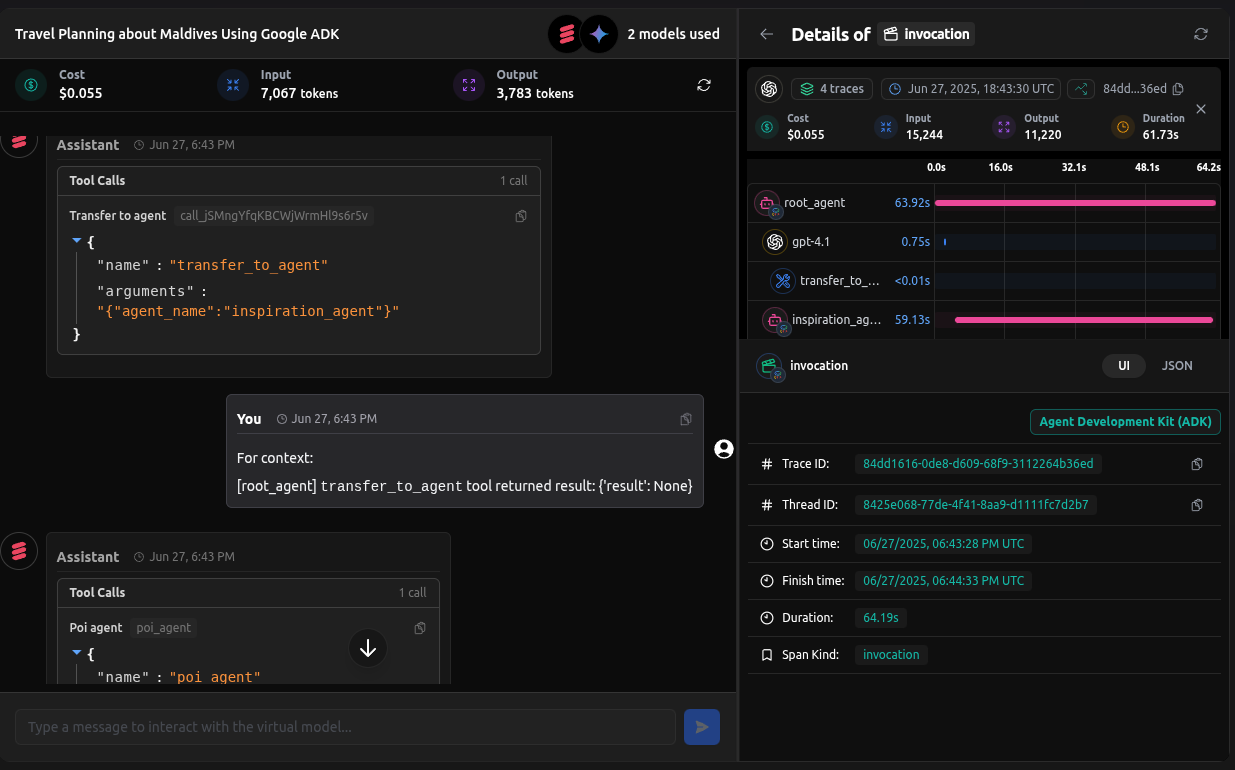
Checkout: https://app.langdb.ai/sharing/threads/8425e068-77de-4f41-8aa9-d1111fc7d2b7
Code
- LangDB Samples: https://github.com/langdb/langdb-samples/tree/main/examples/google-adk/travel-concierge
Overview
The Travel Concierge is a sophisticated agent system built with Google ADK that handles the complete travel lifecycle through specialized sub-agents.
Travel Concierge Architecture
The system consists of these specialized sub-agents:
- Main Agent: Orchestrates the workflow and routes user queries to specialized sub-agents.
- Inspiration Agent: Helps users discover travel destinations based on preferences.
- Planning Agent: Creates detailed itineraries and travel plans.
- Booking Agent: Assists with booking flights, hotels, and activities.
- Pre-Trip Agent: Provides preparation guidance before departure.
- In-Trip Agent: Offers real-time assistance during travel.
- Post-Trip Agent: Collects feedback and helps with post-travel tasks.
Key Benefits
With LangDB, this multi-agent system gains significant capabilities:
- Seamless Integration: All LLM calls flow through a centralized AI gateway
- Tool Abstraction: Virtual MCPs simplify integration with external services
- End-to-End Tracing: Complete visibility into agent interactions and tool usage
- Flexible Model Selection: Choose any model without code changes
- Centralized Configuration: Tools, guardrails, and monitoring managed in one place
Installation
pip install google-adk "pylangdb[adk]" python-dotenv
Environment Variables
Create a .env file in your project root with the following variables:
# Required for AI platform integration
LANGDB_API_KEY="your_api_key_here"
LANGDB_PROJECT_ID="your_project_id_here"
Project Structure
travel-concierge/
├── .env
├── README.md
└── travel_concierge/
    ├── agent.py           # Main orchestrator agent
    ├── __init__.py
    ├── prompt.py
    ├── profiles/          # User profile templates
    ├── shared_libraries/  # Common utilities
    ├── sub_agents/        # Specialized travel agents
    │   ├── booking/
    │   ├── inspiration/
    │   ├── in_trip/
    │   ├── planning/
    │   ├── post_trip/
    │   └── pre_trip/
    └── tools/             # Shared tools
How the Integration Works
Seamless LLM Integration
The key to enhancing Google's ADK sample is directing all LLM calls through a centralized AI gateway. This is achieved through the Python SDK:
# travel_concierge/__init__.py

from pylangdb.adk import init

# Initialize LangDB tracing BEFORE importing any Google ADK modules
# This sends all LLM API calls through LangDB's gateway
init()
By calling init() before any Google ADK imports, the integration:
- Patches the ADK's underlying model calling mechanisms
- Routes all LLM requests through LangDB's API
- Attaches tracing metadata to each request
- Captures all agent-to-agent handoffs and tool calls
This is a significant architectural improvement over the original sample, which requires manual instrumentation to achieve observability.
Virtual Model References
Instead of hardcoding model names or building complex tool integration, we reference LangDB virtual models in the agent definitions:
# travel_concierge/agent.py

from google.adk.agents import Agent
from .prompt import MAIN_AGENT_PROMPT
from .sub_agents.inspiration import inspiration_agent
from .sub_agents.planning import planning_agent
from .sub_agents.booking import booking_agent
from .sub_agents.pre_trip import pre_trip_agent
from .sub_agents.in_trip import in_trip_agent
from .sub_agents.post_trip import post_trip_agent

# Main orchestrator agent
travel_concierge = Agent(
    model="gemini/gemini-2.5-pro-preview",
    name="travel_concierge",
    description="A comprehensive travel assistant that helps with all phases of travel planning and execution.",
    instruction=MAIN_AGENT_PROMPT,
    sub_agents=[
        inspiration_agent,
        planning_agent,
        booking_agent,
        pre_trip_agent,
        in_trip_agent,
        post_trip_agent
    ]
)

# This is the entry point for the ADK
root_agent = travel_concierge
Notice the model="langdb/travel_concierge_main" parameter. This doesn't point directly to a specific LLM but to a LangDB Virtual Model that can have:
- A specific underlying LLM (like Google's Gemini Pro)
- Attached tools and MCPs
- Guardrails for input/output validation
- Custom handling and retry logic
This approach offloads significant complexity from the application code to LangDB AI gateway.
Simplified Sub-Agent Implementation
The inspiration_agent uses a virtual model that connects to a Google Maps MCP. The agent code itself only needs to reference the tools, not implement them:
# travel_concierge/sub_agents/inspiration/agent.py

from google.adk.agents import Agent, AgentTool
from . import prompt

inspiration_agent = Agent(
    model= "langdb/inspiration_agent_z73m3wmd", # Virtual Model
    name="inspiration_agent",
    description="A travel inspiration agent who inspire users, and discover their next vacations; Provide information about places, activities, interests,",
    instruction=prompt.INSPIRATION_AGENT_INSTR,
    # Include map_tool so the agent can verify POIs on Google Maps after invoking poi_agent
    tools=[
        AgentTool(agent=place_agent),
        AgentTool(agent=poi_agent),
    ],
)
Key Benefit: The agent code is significantly cleaner. All tool configuration is offloaded to the central platform, allowing you to:
- Change search providers without code changes
- Add guardrails for travel queries
- Deploy updates to tools without redeploying your application
Tool Definitions vs. Virtual MCPs
Original Approach (Tool Implementation)
In the original Google ADK sample, you would need to implement a complex tool to interact with the Google Places API directly:
# travel_concierge/tools/map.py (Original Approach Snippet)

import os
import requests
from google.adk.tools import ToolContext

class PlacesService:
    """Wrapper to Places API."""
    def find_place_from_text(self, query: str):
        """Fetches place details using a text query."""
        # ... complex request and parsing logic ...

# The tool function itself
def map_tool(key: str, tool_context: ToolContext):
    # ... logic to inspect state and call PlacesService ...
    pois = tool_context.state[key]["places"]
    for poi in pois:
        location = poi["place_name"] + ", " + poi["address"]
        result = places_service.find_place_from_text(location)
        # ... update state with results ...
    return {"places": pois}

# Initialize with API key from environment
search_tool = SearchTool(os.environ.get("SEARCH_API_KEY"))
This approach requires:
- Managing API keys in your environment
- Implementing error handling and retries
- Deploying code changes for API updates
- Writing custom integration code for each tool
Enhanced Approach (Virtual MCPs)
With the Virtual MCP approach, you offload the entire tool implementation to the central platform. This means:
- No tool implementation code needed in your application.
- API keys are managed securely in the platform.
- You get built-in error handling and retries.
- Tools can be updated or switched without code changes.
Configuring Virtual Models and MCPs
This approach separates tool configuration from code, moving it to a web interface where it can be managed and updated without deployments.
Creating Virtual MCP Servers
Virtual MCP servers act as API gateways to external tools and services:
- In the LangDB UI, navigate to Projects → MCP Servers.
- Click + New Virtual MCP Server and create the necessary MCPs. Each MCP is then connected to a virtual model, which is used by a specific agent:
- Inspiration Agent uses a virtual model connected to a Google Maps MCP.
- Planning Agent uses a virtual model connected to an Airbnb MCP.
- Search Agent uses a virtual model connected to a Tavily Search MCP.
Attaching MCPs to Virtual Models
Virtual models connect your agent code to the right tools automatically:
- Navigate to Models → + New Virtual Model.
- For the Inspiration Agent:
- Name:
travel_inspiration_agent - Base Model:
anthropic/claude-sonnet-4 - Attach the Tavily Search MCP from step 1
- Add optional guardrails (e.g., content filters for travel advice)
- Name:
- For the Google Search agent in shared tools:
- Name:
google_search_agent - Base Model:
gemini/gemini-2.5-pro-preview - Attach the Google Places MCP from step 1
- Add custom response templates for place recommendations
- Name:
Key Benefits:
- Separation of Concerns: Code handles agent orchestration while LangDB handles tools and models
- Dynamic Updates: Change tools without redeploying your application
- Security: API keys stored securely in LangDB, not in application code
- Monitoring: Track usage patterns and error rates in one place
Run the Agent
adk web
Navigate to http://localhost:8000, select travel_concierge, and start your travel planning conversation.
Example Conversation with Traced Tool Calls
Here is an example conversation that shows how the inspiration_agent uses a virtual model connected to a Google Maps MCP to provide travel suggestions.
User Input:
Inspire me about Maldives
Agent Execution Flow:
- The root
travel_conciergeagent receives the request and transfers control to theinspiration_agent.- Tool Call:
transfer_to_agent(agent_name="inspiration_agent")
- Tool Call:
- The
inspiration_agentis activated. Its virtual model is configured to use the Google Maps MCP.- Tool Call:
poi_agent(request="Maldives")
- Tool Call:
- The Google Maps MCP is invoked, which searches for points of interest in the Maldives and returns a structured list of places with details, ratings, and map links.
Final Agent Response:
Of course, the Maldives is a stunning choice! Here are a few points of interest to get you started on your dream vacation:

1. North Malé Atoll

Highlights: A stunning coral island known for its powdery white sand, turquoise waters, vibrant marine life, and luxury resorts. Perfect for snorkeling, diving, and relaxation.
Rating: 4.7
Map: https://www.google.com/maps/search/?api=1&query=4.416667,73.5&query_place_id=ChIJs_UZm7KJPzsRyXC6lVstCGY

2. Ari Atoll

Highlights: Renowned for its crystal-clear waters and diverse marine life, including whale sharks, manta rays, and colorful reefs, making it a diver’s paradise.
Rating: 4.4
Map: https://www.google.com/maps/search/?api=1&query=3.8833333,72.8333333&query_place_id=ChIJc2fMBIzdQDsRml476HWWT5g

3. Malé City

Highlights: The bustling capital city featuring the 17th-century Hukuru Miskiy mosque, Maldives Islamic Centre, vibrant markets, and local eateries. Great for experiencing Maldivian culture.
Rating: 4.3
Map: https://www.google.com/maps/search/?api=1&query=4.1752709,73.5091172&query_place_id=ChIJVUvxlVV-PzsRV7p9OeoztoE

Would you like to dive deeper into any of these destinations? Or, if you're feeling inspired and ready to start planning, I can hand you over to our planning_agent to help with itineraries, flights, and hotels.
Full Tracing with LangDB
The true power of the LangDB integration becomes apparent in the comprehensive tracing capabilities. While the original Google ADK sample provides basic conversation logging, LangDB captures every aspect of the agent system's operation:
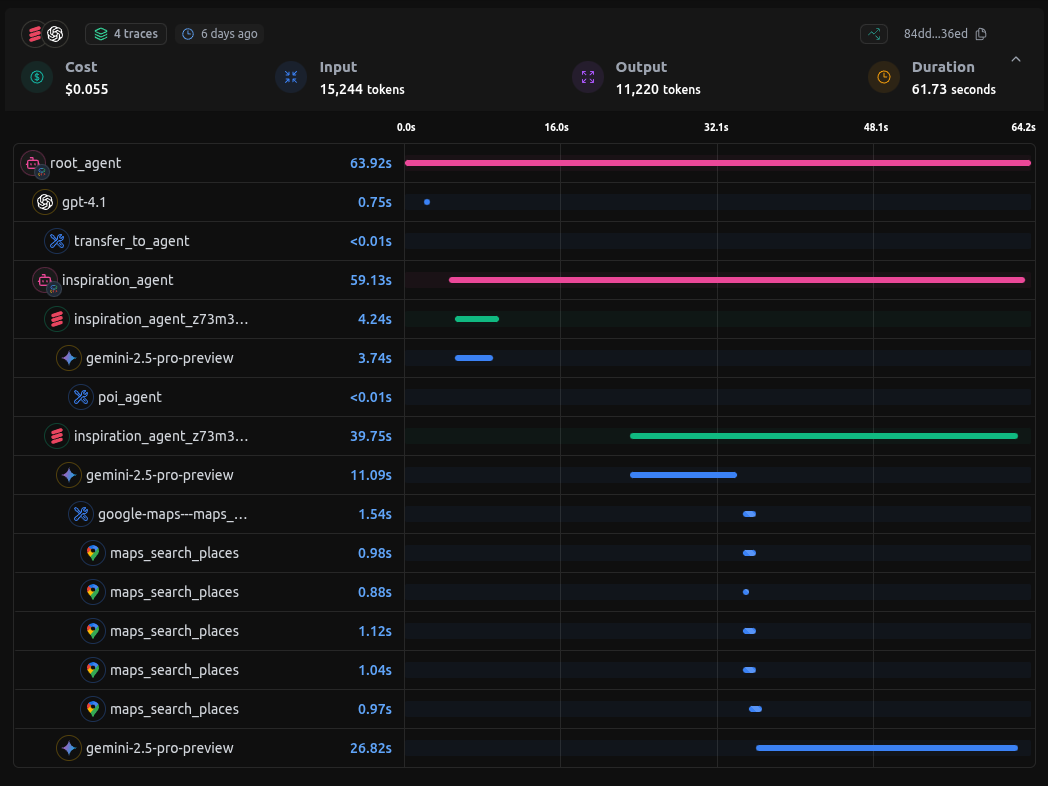
End-to-end tracing in LangDB shows all agent interactions and tool calls
You can checkout the entire conversation here:
Checkout: Travel Concierge Thread using Google ADK
In the LangDB trace view, you can see:
- The exact flow paths between agents
- Every tool call made through virtual MCPs
- Complete inputs and outputs of each model invocation
- Performance metrics and token usage
- Errors and retries (if any occurred)
Conclusion: Benefits of LangDB Integration
By enhancing Google's ADK Travel Concierge sample with LangDB integration, we've achieved several significant improvements:
- Architectural Simplification: Cleaner code with less boilerplate by offloading tool logic to LangDB
- Dynamic Tool Configuration: Change tools and models without code changes
- Enhanced Security: API keys managed centrally in LangDB
- Complete Observability: End-to-end tracing of all agent interactions
- Improved Development Workflow: Update agent capabilities without redeployment
This approach demonstrates how LangDB's AI gateway can enhance agent frameworks by providing a layer of abstraction that simplifies development while adding powerful capabilities.