Working with OpenAI Agents SDK
LangDB helps you add full tracing and observability to your OpenAI Agents SDK workflows—without changing your core logic. With a one-line initialization, LangDB captures model calls, tool invocations, and intermediate steps, giving you a complete view of how your agent operates.
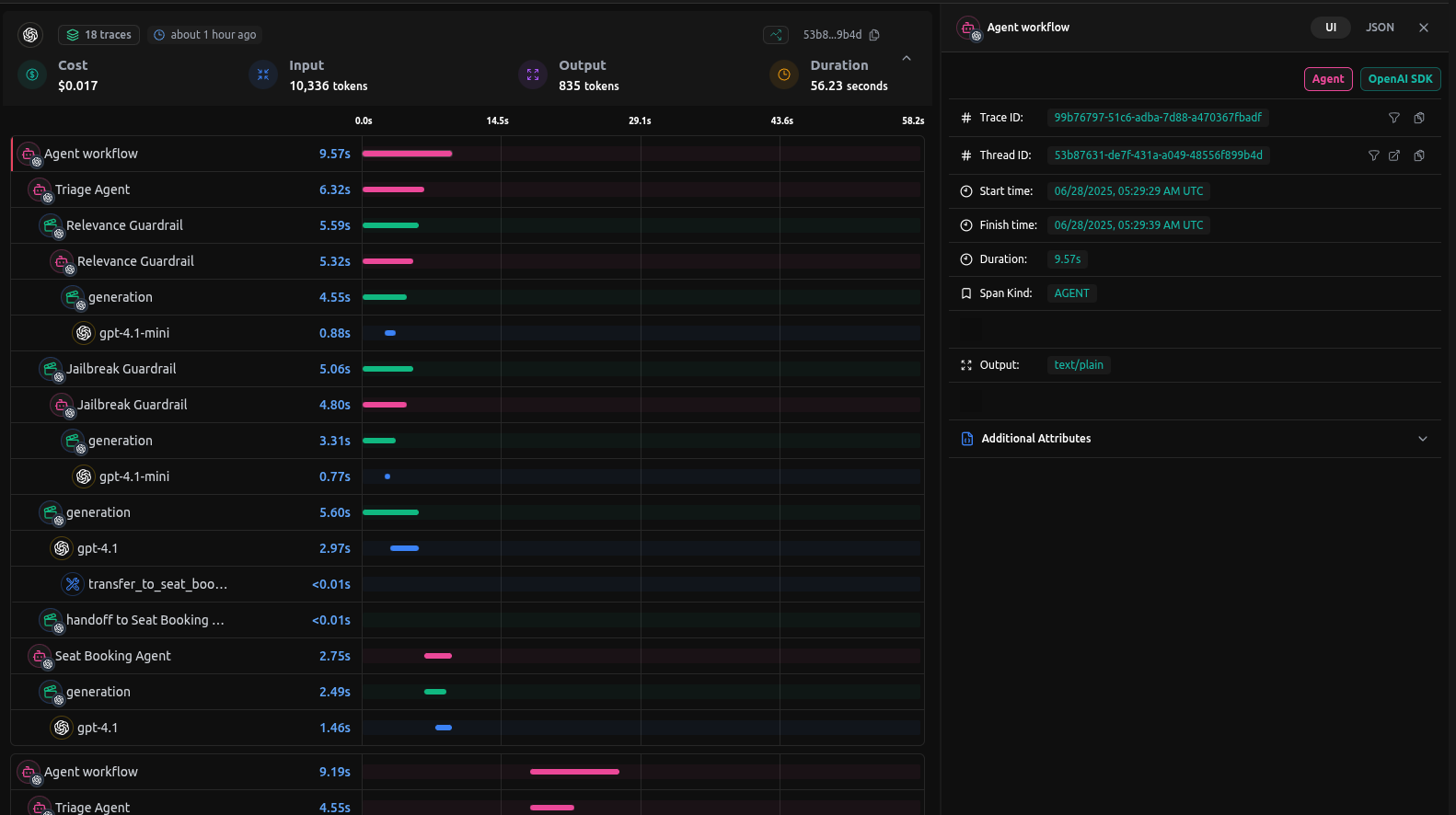
Checkout: https://app.langdb.ai/sharing/threads/53b87631-de7f-431a-a049-48556f899b4d
Installation
Enable end-to-end tracing for your OpenAI Agents SDK agents by installing the pylangdb client with the openai feature flag:
pip install 'pylangdb[openai]'
Quick Start
Export Environment Variables
Set your LangDB credentials:
export LANGDB_API_KEY="<your_langdb_api_key>"
export LANGDB_PROJECT_ID="<your_langdb_project_id>"
Initialize Tracing
Import and run the initialize before configuring your OpenAI client:
from pylangdb.openai import init
# Initialise LangDB
init()
Configure OpenAI Client and Agent Runner
# Agent SDK imports
from agents import (
    Agent,
    Runner,
    set_default_openai_client,
    RunConfig,
    ModelProvider,
    Model,
    OpenAIChatCompletionsModel
)
from openai import AsyncOpenAI

# Configure the OpenAI client with LangDB headers
client = AsyncOpenAI(
    api_key=os.environ["LANGDB_API_KEY"],
    base_url=os.environ["LANGDB_API_BASE_URL"],
    default_headers={"x-project-id": os.environ["LANGDB_PROJECT_ID"]}
)
set_default_openai_client(client)

# Create a custom model provider for advanced routing
class CustomModelProvider(ModelProvider):
    def get_model(self, model_name: str | None) -> Model:
        return OpenAIChatCompletionsModel(model=model_name, openai_client=client)

agent = Agent(
    name="Math Tutor",
    instructions="You are a helpful assistant",
    model="openai/gpt-4.1", # Choose any model from avaialable model on LangDB
)
# Register your custom model provider to route model calls through LangDB
CUSTOM_MODEL_PROVIDER = CustomModelProvider()

# Assign a unique group_id to link all steps in this session trace
group_id = str(uuid.uuid4())
response = await Runner.run(
    agent,
    input="Hello, world!",
    run_config=RunConfig(
        model_provider=CUSTOM_MODEL_PROVIDER,  # Inject custom model provider
        group_id=group_id                      # Link all steps to the same trace
    )
)
Once executed, LangDB links all steps—model calls, intermediate tool usage, and runner orchestration—into a single session trace.
Complete OpenAI Agents SDK Example
Here is a full example based on OpenAI Agents SDK Quickstart which uses LangDB Tracing.
Example code
Check out the full sample on GitHub: https://github.com/langdb/langdb-samples/tree/main/examples/openai/openai-agents-tracing
Setup Environment
pip install openai-agents 'pylangdb[openai]'
Export Environment Variables
export LANGDB_API_KEY="<your_langdb_api_key>"
export LANGDB_PROJECT_ID="<your_langdb_project_id>"
main.py
# Initialize LangDB tracing
from pylangdb.openai import init
init()

# Agent SDK imports
from agents import (
    Agent,
    Runner,
    set_default_openai_client,
    set_default_openai_key,
    set_default_openai_api,
    RunConfig,
    ModelProvider,
    Model,
    OpenAIChatCompletionsModel
)
from openai import AsyncOpenAI
import os
import uuid
import asyncio


# Configure the OpenAI client with LangDB headers
client = AsyncOpenAI(api_key=os.environ["LANGDB_API_KEY"],
        base_url=os.environ["LANGDB_API_BASE_URL"],
        default_headers={"x-project-id": os.environ["LANGDB_PROJECT_ID"]})

# Set the configured client as default with tracing enabled
set_default_openai_client(client, use_for_tracing=True)
set_default_openai_api(api="chat_completions")
# set_default_openai_key(os.environ["LANGDB_API_KEY"])

# Create a custom model provider for advanced routing
class CustomModelProvider(ModelProvider):
    def get_model(self, model_name: str | None) -> Model:
        return OpenAIChatCompletionsModel(model=model_name, openai_client=client)

# Register your custom model provider to route model calls through LangDB
CUSTOM_MODEL_PROVIDER = CustomModelProvider()

math_tutor_agent = Agent(
    name="Math Tutor",
    handoff_description="Specialist agent for math questions",
    instructions="You provide help with math problems. Explain your reasoning at each step and include examples",
    model="anthropic/claude-3.7-sonnet"
)

history_tutor_agent = Agent(
    name="History Tutor",
    handoff_description="Specialist agent for historical questions",
    instructions="You provide assistance with historical queries. Explain important events and context clearly.",
    model="gemini/gemini-2.0-flash" # Choose any model available on LangDB
)

triage_agent = Agent(
    name="Triage Agent",
    instructions="You determine which agent to use based on the user's homework question",
    handoffs=[history_tutor_agent, math_tutor_agent],
    model="openai/gpt-4o-mini" # Choose any model available on LangDB
)
# Assign a unique group_id to link all steps in this session trace
group_id = str(uuid.uuid4())

# Define async function to run the agent
async def run_agent():
    response = await Runner.run(
        triage_agent,
        input="who was the first president of the united states?",
        run_config=RunConfig(
            model_provider=CUSTOM_MODEL_PROVIDER,  # Inject custom model provider
            group_id=group_id                      # Link all steps to the same trace
        )
    )
    print(response.final_output)

# Run the async function with asyncio
asyncio.run(run_agent())
Running Your Agent
Navigate to the parent directory of your agent project and use one of the following commands:
python main.py
Output:
The first president of the United States was **George Washington**.

Here's some important context:

*   **The American Revolution (1775-1783):** Washington was the commander-in-chief of the Continental Army during the Revolutionary War. His leadership was crucial in securing American independence from Great Britain.
*   **The Articles of Confederation (1781-1789):** After the war, the United States was governed by the Articles of Confederation. This system proved to be weak and ineffective, leading to calls for a stronger national government.
*   **The Constitutional Convention (1787):** Delegates from the states met in Philadelphia to revise the Articles of Confederation. Instead, they drafted a new Constitution that created a more powerful federal government. Washington presided over the convention, lending his prestige and influence to the process.
*   **The Constitution and the Presidency:** The Constitution established the office of the President of the United States.
*   **Election of 1789:** George Washington was unanimously elected as the first president by the Electoral College in 1789. There were no opposing candidates. This reflected the immense respect and trust the nation had in him.
*   **First Term (1789-1793):** Washington established many precedents for the presidency, including the formation of a cabinet, the practice of delivering an annual address to Congress, and the idea of serving only two terms. He focused on establishing a stable national government, paying off the national debt, and maintaining neutrality in foreign affairs.
*   **Second Term (1793-1797):** Washington faced challenges such as the Whiskey Rebellion and growing partisan divisions. He decided to retire after two terms, setting another crucial precedent for peaceful transitions of power.
*   **Significance:** Washington's leadership and integrity were essential in establishing the legitimacy and credibility of the new government. He is often considered the "Father of His Country" for his pivotal role in the founding of the United States.
Traces on LangDB
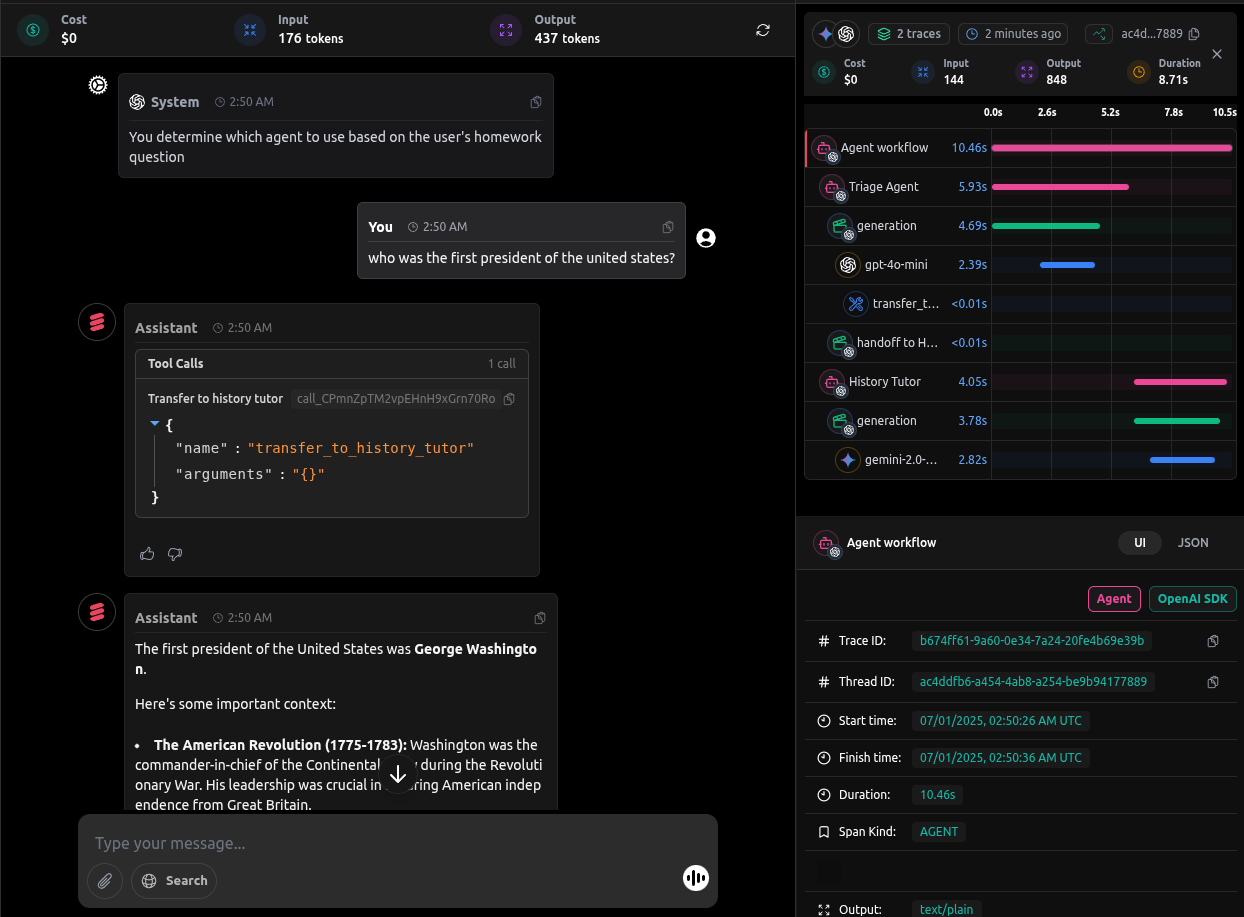
When you run queries against your agent, LangDB automatically captures detailed traces of all agent interactions:
Next Steps: Advanced OpenAI Agents SDK Integration
This guide covered the basics of integrating LangDB with OpenAI Agents SDK using a history and maths agent example. For more complex scenarios and advanced use cases, check out our comprehensive resources in Guides Section.